Clover Virtual Terminal & Invoicing
$299.00
Purchase Clover Gateway/Virtual Terminal
Clover Gateway Transaction Rates
In stock: 44 available
1
Save this product for later
Clover Virtual Terminal & Invoicing
Product Details
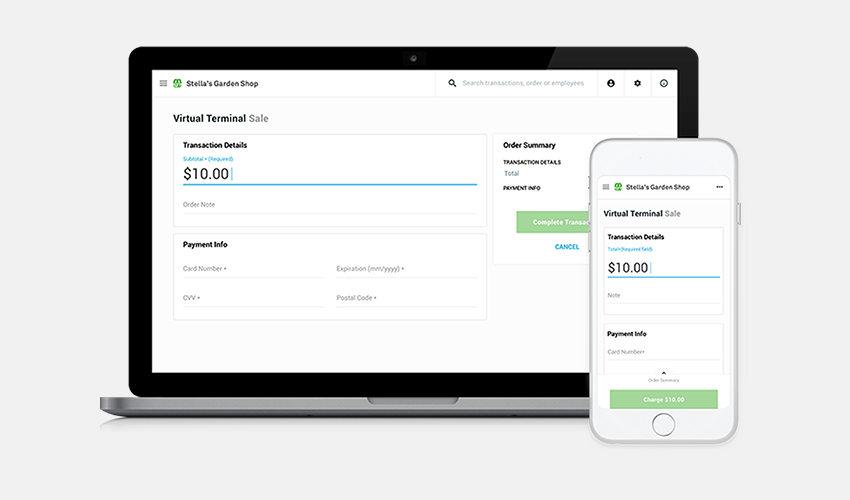
Accept payments online with Virtual Terminal
Don’t have a Clover® device or away from it and don’t want to miss a sale? Clover Virtual Terminal gives you the flexibility and convenience of processing payments – and, refunds – wherever you happen to be. Log into your Clover Web Dashboard from a smartphone, tablet, or computer and you’re ready for business anytime, anywhere.

CONVENIENT
Take credit and debit card payments without a Clover device.

SAFE & SECURE
Our Virtual Terminal helps keep your payment environment PCI compliant and secure with end-to-end encryption.

WORRY‑FREE
No additional monthly fees when using our Virtual Terminal solution. Transactions are charged at the keyed-in rate.
Use email invoicing to get paid faster online
Send a simple invoice to your customers by email and allow them to pay you online by credit or debit card. Invoices can be paid as quickly as within a day. Invoicing is included in your service plan as a feature of Clover® Virtual Terminal.

EASY TO GET STARTED
Generate invoices right away. No POS hardware required and no software to install.

SIMPLE TO USE
Log in to your Clover Web Dashboard from any PC or smart device with an internet connection to send invoice emails.

FASTER PAYMENTS
Inform customers of payment due and provide a more secure way for them to pay you directly online with a credit or debit card.

STREAMLINED REPORTING
Save time and reduce errors with a digital trail of invoices sent, paid, and pending.

MONEY‑SAVING SOLUTION
Reduce supply costs and increase your green initiative by sending invoices by email.

IMPROVED ACCOUNTS RECEIVABLE COLLECTION
Allow your customers to pay around the clock – even after normal business hours.

Run your business from anywhere
- Accept credit and debit card payments directly on any computer, tablet, or smartphone.
- Request customer payments by email and allow customers to pay you by credit or debit card online.
- Take care of all incoming payments: in-store orders, mail or telephone orders, or invoices.
- Send digital receipts via email and monitor all transactions in one dashboard.
- Store your regular customers' card information securely for faster transactions.
- Protect against fraud with address verification service (AVS) and card verification value (CVV).
Virtual Terminal comes pre‑loaded on your dashboard
Already a Clover merchant? Simply log into your Clover Web Dashboard to fire up your virtual point of sale terminal and request or take payments.
Business benefits of using Virtual Terminal
- Enables all merchants. Any business can use Virtual Terminal to securely process credit cards – from restaurants and retailers to services businesses who take payments over-the-phone or by mail.
- Helps avoid payment disruptions. Technical difficulties happen. Using a Virtual POS Terminal gives your business a backup plan in case your normal payment system is interrupted.
- Supports PCI compliance. Customers trust you with their payment data. Our Virtual Terminal credit card processing solution can help shield this payment information from fraud and abuse.
- Syncs seamlessly. All Virtual Terminal payment processing transactions sync with your Clover POS devices to help ensure all sales are tracked in one place.
The right Virtual Terminal for your business
We help merchants overcome the challenges of growing a successful business. In addition to payment processing, our POS solutions can help with inventory management, employee scheduling, loyalty programs, and more. Our cloud-based point-of-sale solutions allow you to run your business anywhere, anytime.
Use email invoicing to get paid faster online
Send a simple invoice to your customers by email and allow them to pay you online by credit or debit card. Invoices can be paid as quickly as within a day. Invoicing is included in your service plan as a feature of Clover® Virtual Terminal.
Easy to get started
Generate invoices right away. No POS hardware required and no software to install.
Simple to use
Log in to your Clover Web Dashboard from any PC or smart device with an internet connection to send invoice emails.
Faster payments
Inform customers of payment due and provide a more secure way for them to pay you directly online with a credit or debit card.
STREAMLINED REPORTING
Save time and reduce errors with a digital trail of invoices sent, paid, and pending.
MONEY‑SAVING SOLUTION
Reduce supply costs and increase your green initiative by sending invoices by email.
IMPROVED ACCOUNTS RECEIVABLE COLLECTION
Allow your customers to pay around the clock – even after normal business hours.

How customers benefit from email invoicing
- Easier payments. Customers no longer have to make dedicated trips to the mailbox to send you payment. They will receive their invoice by email, which provides them with a link to a hosted checkout page for a convenient way to pay by card – from the comfort of home.
- Better recordkeeping. When using paper invoices, storing and retrieving older statements becomes a challenge. Our invoice technology simplifies this process since all invoices sent and payments received are automatically stored online and can be tracked in the Clover Dashboard.
- Less waste. Want to make your customers truly happy? Remove unnecessary paper from their lives and send all future invoices electronically. In fact, going green may help you attract new customers.
Professionally request payment from your customers
Click on Virtual Terminal, and select Send Invoice. Enter the amount due along with customer information.
You May Also Like
Display prices in:USD